Netronic VSW SE vs ScheduleJS

Netronic Visual Scheduling Widget SE and ScheduleJS share three constraints: both render to canvas, neither ships on the public npm registry, and neither provides a project scheduling engine. If you're choosing between them, you're deciding whether your application needs Netronic's framework-agnostic resource scheduling features or ScheduleJS's Angular-only canvas Gantt model.
Start with these questions:
- Is Angular the only target framework for the application?
- Does the application need resource histograms and PDF export without custom implementation?
- Does the team prefer published per-developer pricing or a quote-based commercial model?
This comparison uses these criteria:
- Installation and setup
- Licensing and cost
- Scheduling features
- Rendering model
- Export support
- Framework support
- TypeScript support
- AI support
What to know about Netronic VSW SE and ScheduleJS
The table below summarizes the criteria used in this comparison.
| Feature | Netronic VSW SE | ScheduleJS |
|---|---|---|
| License | Commercial (quote-based) | Commercial (from 1,500 EUR) |
| Free tier | None | None |
| Auto-scheduling | ❌ | ❌ |
| Critical path | ❌ | ❌ |
| Resource management | ✔️ | ✔️ |
| Resource histograms | ✔️ | ❌ |
| Drag-and-drop editing | ✔️ | ✔️ |
| Visual dependency links | ✔️ | ✔️ (ActivityLink) |
| Work calendars | ✔️ | ❌ |
| Undo / redo | ❌ | ❌ |
| React / Angular / Vue wrappers | ❌ (plain JavaScript) | Angular only |
| TypeScript | ✔️ (from v9.0) | ✔️ |
| Export to PDF / Excel | PDF export, no Excel | ❌ |
| Multiple instances per page | ✔️ | ✔️ |
| Public npm registry | ❌ (downloadable bundle) | ❌ (local file install) |
| Rendering model | Canvas | Canvas |
| MCP server | ❌ | ❌ |
| Claude Code skill | ❌ | ❌ |
| Built-in AI assistant | ❌ | ❌ |
Netronic VSW SE
Netronic Visual Scheduling Widget SE is a commercial JavaScript and HTML5 scheduling widget developed by Netronic GmbH (Germany). It renders to an HTML Canvas element and supports resource timelines, resource histograms, drag-and-drop, resize, work calendars, and PDF export. The widget works with any JavaScript framework or with no framework at all.
Netronic VSW SE is a visualization and interaction layer. Project scheduling logic, such as auto-scheduling, critical path calculation, and constraint enforcement, is the application's responsibility.
Public setup notes for Netronic VSW SE
Netronic VSW SE is not on the public npm registry. Public Netronic pages describe a customer evaluation process, the Visual Scheduling Widget API, and ESM and TypeScript support from version 9.0, but they do not publish a copy-paste npm install command for a current package.
Four setup details are safe to plan around from public Netronic material:
- Teams should expect a sales or evaluation flow rather than a public npm install.
- Version 9.0 adds ESM and TypeScript support for modern build setups.
- The widget delegates data management and business logic to the host application.
- Public Netronic docs and blog posts describe API-driven configuration, callbacks, and options rather than a wrapper package for React, Angular, or Vue.
Netronic VSW SE is best when framework reach and histograms matter
Canvas rendering keeps the widget fast at large activity counts. Public Netronic material describes work calendars, resource-oriented planning, and resource histograms as VSW SE capabilities.
The framework-agnostic API works in React, Angular, Vue, or plain JavaScript. No wrapper package is required. The widget includes PDF export.
Netronic VSW SE is the right choice when the application is not Angular-only, or when resource histograms and PDF export are required without custom implementation. ScheduleJS is narrower because it targets Angular and leaves those features to the application.
Netronic VSW SE tradeoffs
Applications need custom implementation for:
- Auto-scheduling
- Critical path
- Baselines
- Task splitting
- Undo/redo
The install process requires downloading the bundle from the Netronic customer portal and placing it in the project manually. Every developer and CI/CD environment must complete this step before running npm install. This adds friction at onboarding and in automated pipelines.
Pricing is quote-based with no published rates. Teams cannot compare costs directly against ScheduleJS without contacting Netronic sales.
Netronic has wider framework reach, but no published entry price. ScheduleJS publishes a 1,500 EUR Enterprise starting price, which makes early budget comparison easier.
Netronic VSW SE cost
Netronic VSW SE uses commercial quote-based pricing. No standard rates are published on the product page. Teams request pricing directly from Netronic GmbH. A trial version is available for evaluation before purchase.
Netronic VSW SE developer experience
TypeScript definitions ship with v9.0 and later. Documentation at netronic.com covers the API reference and configuration options.
Netronic describes VSW SE as a resource-focused model rather than a generic project task model. Teams coming from FullCalendar, DHTMLX Gantt, or Bryntum Gantt need to validate the API terminology during evaluation instead of assuming familiar field names.
The canvas-based rendering means DOM inspection tools show a single canvas element rather than individual task bar elements. Debugging visual output requires the widget's built-in inspection or event API rather than browser developer tools.
Netronic VSW SE AI support
Netronic VSW SE ships no MCP server, no Claude Code skill, and no built-in AI assistant.
The local file distribution is the main blocker for AI agents. An agent following the standard npm install pattern may invent a public registry package, which fails because VSW SE is distributed through Netronic evaluation or customer channels. The resource-focused API also means teams should provide current Netronic documentation before asking an agent to generate implementation code.
Use Netronic VSW SE when resource tooling matters more than public npm
Netronic VSW SE suits teams building resource scheduling applications in any JavaScript environment that need canvas rendering performance, resource histograms, work calendars, and PDF export. The absence of a public npm package and quote-based pricing are the main operational constraints to evaluate before committing.
ScheduleJS
ScheduleJS is a commercial Angular Gantt library developed by AISO SA (Switzerland). The core rendering engine uses the HTML Canvas API rather than DOM elements, which avoids DOM-related bottlenecks when displaying large activity sets. ScheduleJS describes its viewport as supporting smooth scrolling with hundreds of thousands of rows.
ScheduleJS is best treated as a visualization and interaction framework. Rows map to resources, activities map to task bars, layers group activities within a row, and ActivityLink objects draw typed links between activities. Project scheduling logic such as auto-scheduling, critical path calculation, and constraint enforcement is the application's responsibility.
Installing ScheduleJS
ScheduleJS is not on the public npm registry. It requires purchasing a license from AISO SA and downloading the package directly. After receiving the package, place it in a local_modules/ folder in the project root and install it as a local file reference:
yarn add file:./local_modules/schedule
A new Angular project provides the required shell. The ScheduleJS published manual lists Angular 11-era dependency versions. Teams should confirm the supported Angular version with AISO before starting a new implementation.
ng new project-name --style=scss
The install adds all Angular dependencies automatically. The license key must be registered before any ScheduleJS component mounts.
The following shows a team sprint Gantt with four members across a one-week horizon. Setup spans three files: the Angular module, the component class, and the component template.
// app.module.ts
import { NgModule } from '@angular/core';
import { BrowserModule } from '@angular/platform-browser';
import { Locale as BaseLocaleEnUs } from '@js-joda/locale/dist/prebuilt/en-us';
import { LicenseManager, Locale, ScheduleModule } from 'schedule';
import { AppComponent } from './app.component';
import { SprintGanttComponent } from './sprint-gantt/sprint-gantt.component';

@NgModule({
  declarations : [AppComponent, SprintGanttComponent],
  imports      : [BrowserModule, ScheduleModule],
  bootstrap    : [AppComponent]
})
export class AppModule {
  constructor() {
    Locale.updateDefault(BaseLocaleEnUs.US);
    LicenseManager.setLicenseFromKey('your-license-key-here');
  }
}
// sprint-gantt.component.ts
import { Component, Injector } from '@angular/core';
import {
  AppTransactionalService,
  ChronoUnit,
  DefaultScheduleGanttComponentBase,
  GanttChart,
  Layer,
  MutableActivityBase,
  Row,
  TimeUtil
} from 'schedule';

class Task extends MutableActivityBase<{ name: string }> {
  constructor(name: string, startHours: number, durationHours: number) {
    const start = TimeUtil.now() + TimeUtil.ofHours(startHours);
    const end   = start + TimeUtil.ofHours(durationHours);
    super(name, start, end);
    this.setUserObject({ name });
  }
}

class TeamMember extends Row<undefined, undefined, Task> {}

@Component({
  selector    : 'app-sprint-gantt',
  templateUrl : './sprint-gantt.component.html',
  styleUrls   : ['./sprint-gantt.component.scss']
})
export class SprintGanttComponent
    extends DefaultScheduleGanttComponentBase<TeamMember> {

  gantt = new GanttChart<TeamMember>(undefined, this._injector);

  constructor(
    _appTransactionalService: AppTransactionalService,
    _injector: Injector
  ) {
    super(_appTransactionalService, _injector);
  }

  start(): void {
    const tasksLayer = new Layer('Tasks');
    this.gantt.getLayers().push(tasksLayer);

    const alice = new TeamMember('Alice (Frontend)');
    alice.addActivity(tasksLayer, new Task('UI Component Library', 0, 40));

    const bob = new TeamMember('Bob (Backend)');
    bob.addActivity(tasksLayer, new Task('REST API Development', 0, 40));

    this.gantt.addRows(alice, bob);
    this.gantt.getTimeline().showTemporalUnit(ChronoUnit.DAYS, 200);
  }
}
<!-- sprint-gantt.component.html -->
<default-schedule-button-bar [gantt]="gantt"></default-schedule-button-bar>
<div class="timeline-container">
  <div class="timeline-filler"></div>
  <div class="timeline">
    <schedule-date-line  [gantt]="gantt"></schedule-date-line>
    <schedule-event-line [gantt]="gantt"></schedule-event-line>
  </div>
</div>
<default-schedule-gantt-graphic
  class="gantt-graphic"
  [gantt]="gantt"
  [ganttContainerElement]="nativeElement">
</default-schedule-gantt-graphic>
Four setup details require attention:
- The
LicenseManager.setLicenseFromKey()call must come before any ScheduleJS component mounts. - The package name is
schedule, notschedulejs. All import paths use'schedule'. - Resources are
Rowsubclasses and task bars areMutableActivityBasesubclasses. The library uses class extension rather than configuration objects. - Extend
DefaultScheduleGanttComponentBaseto wire up the Angular lifecycle.
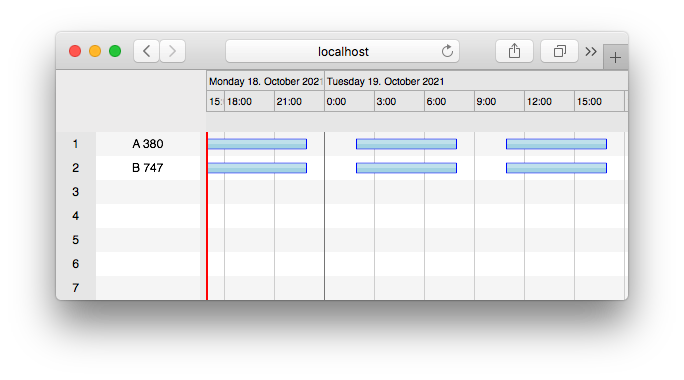
ScheduleJS is best when Angular canvas rendering is the priority
Canvas rendering is the core differentiator. ScheduleJS draws directly to a canvas element, avoiding the DOM node overhead that accumulates at large row counts. The library handles hundreds of thousands of rows with smooth navigation.
Canvas provides pixel-level control, letting teams build fully custom activity renderers, row heights, and interaction layers without CSS specificity conflicts. Three layout types ship out of the box: Gantt layout, chart/histogram layout, and agenda layout.
Teams migrating from FlexGanttFX (the Java desktop predecessor) get a close API mapping, which reduces rewrite scope when moving to the web.
ScheduleJS publishes a starting price, while Netronic VSW SE requires a sales quote. Both products use local file distribution. ScheduleJS is the narrower choice because it targets Angular only.
ScheduleJS tradeoffs
ScheduleJS is Angular-only. React, Vue, and plain JavaScript applications require a different library.
The library provides ActivityLink visualization but not a project scheduling engine. Applications need custom implementation for:
- Auto-scheduling
- Critical path calculation
- Baselines
- Task splitting
- Undo/redo
- Resource histograms
- Work calendars
- PDF or Excel export
The install process does not use a public registry. Every developer and CI/CD environment must receive the ScheduleJS package through a separate distribution step before running yarn add file:./local_modules/schedule. This adds friction at onboarding and in automated pipelines.
ScheduleJS leaves more features to custom implementation than Netronic VSW SE, including histograms, work calendars, and PDF export. It also restricts the framework choice to Angular.
ScheduleJS cost
AISO SA publishes pricing from 1,500 EUR for the ScheduleJS Enterprise perpetual license. The license includes one year of updates, support, and maintenance for one application and one developer. Three license schemes are listed: internal use, OEM, and SaaS.
ScheduleJS developer experience
TypeScript definitions ship with the package. Documentation at schedulejs.com covers the developer manual and API reference.
The data model differs from DOM-based Gantt libraries. Resources are Row subclasses, activities are MutableActivityBase subclasses, and layers group activities within a row. Developers coming from property-based configuration libraries need time to adjust to the class-extension pattern.
The DefaultScheduleGanttComponentBase handles Angular lifecycle integration. Extending it is the recommended starting point for new components.
ScheduleJS AI support
ScheduleJS ships no MCP server, no Claude Code skill, and no built-in AI assistant.
The local file install is the main blocker for AI agents. An agent following the standard npm install pattern generates npm install schedulejs or npm install schedule, both of which fail because the package is not on the public registry. The class-extension data model diverges from the configuration-object patterns common in Gantt examples, so agents unfamiliar with ScheduleJS are likely to generate incorrect code for row and activity definitions.
Use ScheduleJS when Angular needs canvas-scale rendering
ScheduleJS suits Angular teams that need canvas-level performance for very large datasets, pixel-level rendering control, or a migration path from a FlexGanttFX desktop application. It fits applications that provide their own scheduling logic and already show DOM overhead at the required row count.
Which one to pick
Netronic VSW SE is the right choice when the application targets any JavaScript environment and needs resource histograms, work calendars, and built-in PDF export. The quote-based pricing model means teams need to contact Netronic sales before comparing costs directly with ScheduleJS.
ScheduleJS suits a narrower use case: Angular teams with very large datasets, a need for pixel-level canvas rendering control, or a migration from FlexGanttFX. The application must provide its own scheduling logic, histograms, and export. The 1,500 EUR Enterprise published price gives teams a known starting point that Netronic does not publish.
Neither library ships AI tooling. Teams using AI coding agents should plan to provide current documentation in both cases, particularly for Netronic VSW SE setup and the class-extension data model in ScheduleJS.
Bryntum Gantt
Bryntum Gantt is the stronger commercial choice when your application needs auto-scheduling, resource management, and PDF export without local file distribution or quote-based pricing. It supports React, Angular, Vue, and plain JavaScript, and Bryntum publishes per-developer pricing.
Bryntum also provides a free Gantt trial download. Trial packages and framework wrappers are available on the public npm registry, and the Bryntum Gantt npm repository guide explains licensed package access.