DHTMLX Scheduler vs Mobiscroll Event Calendar

DHTMLX Scheduler and Mobiscroll Event Calendar both handle day, week, and month views with drag-and-drop editing and TypeScript support. If you're choosing between them, you're deciding whether your project can use DHTMLX Scheduler Standard under the GPL license or whether your application needs Mobiscroll's bundled resource scheduling and timeline views in a commercial package.
Start with these questions:
- Does the application need a resource timeline view in the first release?
- Can the team support CLI authentication and a private npm registry for every developer and CI/CD environment?
- Does the project qualify for the DHTMLX GPL Standard license?
This comparison uses these criteria:
- Installation and setup
- Licensing and cost
- Calendar views
- Resource scheduling
- Framework support
- TypeScript support
- AI support
What to know about DHTMLX Scheduler and Mobiscroll Event Calendar
The table below summarizes the criteria used in this comparison.
| Feature | DHTMLX Scheduler | Mobiscroll Event Calendar |
|---|---|---|
| License | GPL (Standard) / Commercial (Pro) | Commercial (perpetual internal / SaaS subscription) |
| Free tier | GPL Standard edition | 90-day trial |
| Day / Week / Month views | ✔️ (Standard) | ✔️ |
| Timeline / resource view | Pro only | ✔️ |
| Drag-and-drop | ✔️ | ✔️ |
| Event resize | ✔️ | ✔️ |
| Recurring events | ✔️ | ✔️ |
| Undo / redo | Delete-undo popup only | ❌ |
| Export to PDF / Excel | Online service (watermark on GPL) | Print add-on, no Excel |
| ICS import / export | ✔️ | ❌ |
| Multiple instances per page | Commercial license or higher | ✔️ |
| Public npm registry | ✔️ | ❌ (CLI authentication required) |
| React / Angular / Vue wrappers | ✔️ (+ Svelte) | ✔️ (+ jQuery, Ionic) |
| TypeScript | ✔️ | ✔️ |
| MCP server | ✔️ | ❌ |
| Claude Code skill | ❌ | ❌ |
| Built-in AI assistant | ❌ | ❌ |
DHTMLX Scheduler
DHTMLX Scheduler is a JavaScript calendar and scheduling library in active development since 2009. The Standard edition is GPL-licensed and ships day, week, month, year, agenda, and map views without charge for compatible open-source projects. Paid licenses unlock Pro features, including the timeline and resource views required for resource scheduling applications.
The library uses a global scheduler singleton. All configuration goes on the global object before scheduler.init() is called. Running two independent scheduler instances on the same page requires the Commercial license or higher.
Installing DHTMLX Scheduler
The Standard (GPL) package is on the public npm registry:
npm install dhtmlx-scheduler@7.2.13
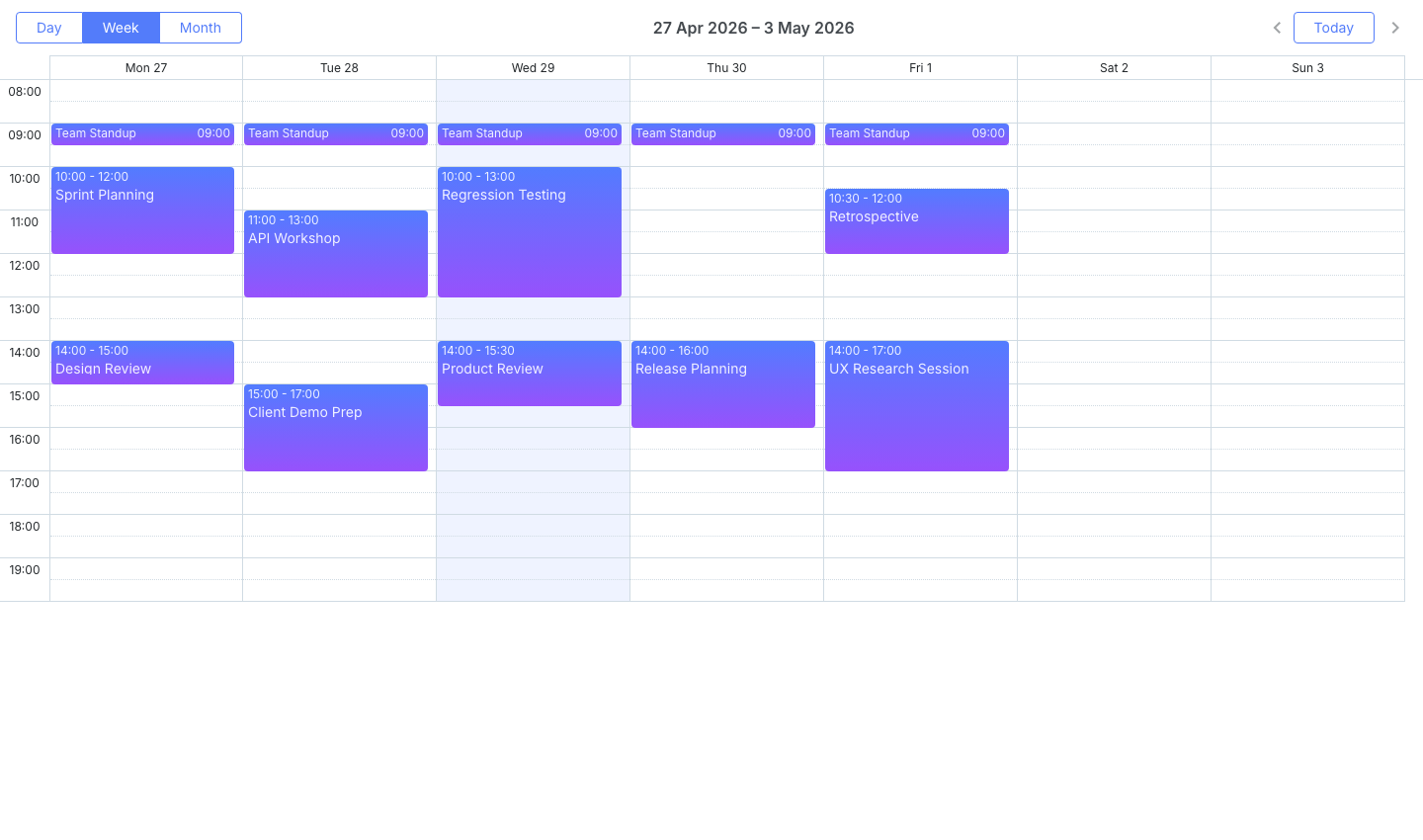
This minimal setup shows a week view with events spanning April 27 to May 1. Configuration must come before scheduler.init():
<!-- index.html -->
<style>
  html, body { margin: 0; height: 100%; }
  #container { width: 100%; height: 100vh; }
</style>
<div id="container"></div>
import { scheduler } from 'dhtmlx-scheduler';
import 'dhtmlx-scheduler/codebase/dhtmlxscheduler.css';

scheduler.config.date_format = '%Y-%m-%d %H:%i';
scheduler.config.first_hour  = 8;
scheduler.config.last_hour   = 20;

scheduler.init('container', new Date(2026, 3, 28), 'week');

scheduler.parse([
  { id : 1, text : 'Team Standup',    start_date : '2026-04-27 09:00', end_date : '2026-04-27 09:30' },
  { id : 2, text : 'Sprint Planning', start_date : '2026-04-27 10:00', end_date : '2026-04-27 12:00' },
  { id : 3, text : 'Design Review',   start_date : '2026-04-27 14:00', end_date : '2026-04-27 15:00' },
  { id : 4, text : 'API Workshop',    start_date : '2026-04-28 11:00', end_date : '2026-04-28 13:00' },
  { id : 5, text : 'Client Demo Prep', start_date : '2026-04-28 15:00', end_date : '2026-04-28 17:00' }
]);
Three setup details require attention:
- The default date format is
DD-MM-YYYY HH:mm. Using ISO-style strings requires settingscheduler.config.date_format = '%Y-%m-%d %H:%i'. - The
scheduler.init()call takes a container ID, a date object (not a string), and a view name. Passing a date string produces silent failures. - The
scheduler.parse()call must come afterscheduler.init().
DHTMLX Scheduler is best when GPL access or perpetual licensing matters
The GPL Standard edition is free for open-source projects with no time limit and no per-developer fee. Day, week, month, year, agenda, and map views are fully functional in Standard with drag-and-drop, custom tooltips, dark theme, and CSS variable theming.
Paid licenses are perpetual with no annual subscription. The Individual license at $599 is the lowest entry price among commercial schedulers that include a timeline view (Pro). The public npm registry install works without any private registry configuration, which simplifies CI/CD setup.
DHTMLX gives open-source projects a working calendar scheduler at no cost, while Mobiscroll starts from a commercial trial and paid project license. For teams that need the timeline view but cannot justify per-project commercial pricing, DHTMLX Pro is available at a per-developer perpetual rate.
DHTMLX Scheduler tradeoffs
The timeline view, units view, grid view, and week agenda view are all Pro-only. For any application where resource scheduling is the primary use case, the Standard edition is a weak evaluation starting point.
Multiple independent scheduler instances on the same page require the Commercial license ($1,299). For multi-panel dashboards or applications embedding a scheduler in more than one component, teams must plan for this constraint early.
The global singleton carries state between test runs. DHTMLX Scheduler has no general-purpose undo/redo stack. The documented undo behavior is a deletion undo popup only.
Online export to PDF and PNG uses the DHTMLX-hosted service. GPL output includes a watermark. Watermark-free export is tied to the paid-license support period. The local export module is free with Commercial, Enterprise, and Ultimate licenses. Individual-license holders purchase it as an add-on.
DHTMLX Scheduler requires a Pro license before it becomes a resource scheduler, while Mobiscroll includes the timeline view in its $995 base package.
DHTMLX Scheduler cost
The Standard (GPL) edition is free for open-source projects. Commercial licenses are perpetual:
- Individual: $599 (includes Pro features)
- Commercial: $1,299 (required for multiple independent instances on the same page)
- Enterprise: $2,899
DHTMLX Scheduler developer experience
TypeScript type definitions are included in the package. Documentation at dhtmlx.com covers all views with code examples.
The initialization order is the key constraint: scheduler.config.* properties must come before scheduler.init(), and scheduler.parse() must come after. Deviating from this order produces stale state or a blank view.
React, Angular, Vue, and Svelte wrappers are available. The global singleton makes unit testing harder because state persists between tests unless explicitly reset.
DHTMLX Scheduler AI support
DHTMLX ships an MCP server that covers all major DHTMLX products, including Scheduler, Gantt, Suite, Kanban, Diagram, and Spreadsheet. It uses retrieval-augmented generation over current documentation. The command to register it in Claude Code:
claude mcp add --transport http dhtmlx-mcp https://docs.dhtmlx.com/mcp
DHTMLX ships no dedicated Claude Code skill and no built-in AI assistant for end users.
The global singleton is the main friction point for AI agents. An agent may generate code that works for a single instance but breaks when the application mounts a second scheduler view.
Use DHTMLX Scheduler when GPL access or DHTMLX Pro fits
DHTMLX Scheduler Standard fits open-source projects that need day, week, and month calendar views with drag-and-drop at no cost. DHTMLX Pro suits teams that need a resource timeline, want perpetual commercial licensing, and do not need multiple independent scheduler instances on the same page without the Commercial tier.
Mobiscroll Event Calendar
Mobiscroll Event Calendar is a commercial JavaScript calendar component that includes a resource timeline view. It ships four configurable view types (calendar, scheduler, timeline, and agenda) with drag-and-drop, resize, and drag-to-create included. Resources carry a color property that applies automatically to their events.
The Event Calendar is not available on the public npm registry. It requires authentication via the Mobiscroll CLI before any npm install command succeeds.
Installing Mobiscroll Event Calendar
Two commands set up Mobiscroll access: the global CLI install and a per-project config step.
npm install -g @mobiscroll/cli
mobiscroll config javascript
The mobiscroll config javascript command opens a browser to authenticate with Mobiscroll and configures npm to use the Mobiscroll private registry. The CLI prompts complete the package installation. A trial account is sufficient for evaluation.
The following shows a resource timeline for four team members across April 2026:
<!-- index.html -->
<style>
  html, body { margin: 0; padding: 0; height: 100%; font-family: Arial, sans-serif; }
  #app { padding: 16px; height: 100vh; box-sizing: border-box; }
  #calendar { height: calc(100vh - 32px); }
</style>
<div id="app">
  <div id="calendar"></div>
</div>
import * as mobiscroll from '@mobiscroll/javascript';
import '@mobiscroll/javascript/dist/css/mobiscroll.min.css';

mobiscroll.setOptions({ theme: 'material', themeVariant: 'light' });

mobiscroll.eventcalendar('#calendar', {
  view : {
    timeline : { type : 'month' }
  },
  selectedDate : new Date(2026, 3, 1).getTime(),
  dragToCreate : true,
  dragToMove   : true,
  dragToResize : true,
  resources : [
    { id : 1, name : 'Alice (Frontend)', color : '#4f46e5' },
    { id : 2, name : 'Bob (Backend)',    color : '#0ea5e9' },
    { id : 3, name : 'Carol (Design)',   color : '#10b981' },
    { id : 4, name : 'Dave (QA)',        color : '#f59e0b' }
  ],
  data : [
    { id : '1', resource : 1, title : 'UI Component Library', start : new Date(2026, 3, 6),  end : new Date(2026, 3, 11) },
    { id : '2', resource : 2, title : 'REST API Development', start : new Date(2026, 3, 6),  end : new Date(2026, 3, 11) },
    { id : '3', resource : 3, title : 'Wireframes v2',        start : new Date(2026, 3, 6),  end : new Date(2026, 3, 9)  },
    { id : '4', resource : 4, title : 'Regression Suite',     start : new Date(2026, 3, 6),  end : new Date(2026, 3, 8)  }
  ]
});
Four setup details require attention:
- The
selectedDateproperty uses a timestamp. Calling.getTime()avoids string parsing and timezone ambiguity. - Events use the
dataproperty, notevents. - The resource field on each event is
resource, notresourceId. - Calling
mobiscroll.setOptions()before any component mount applies the theme globally.
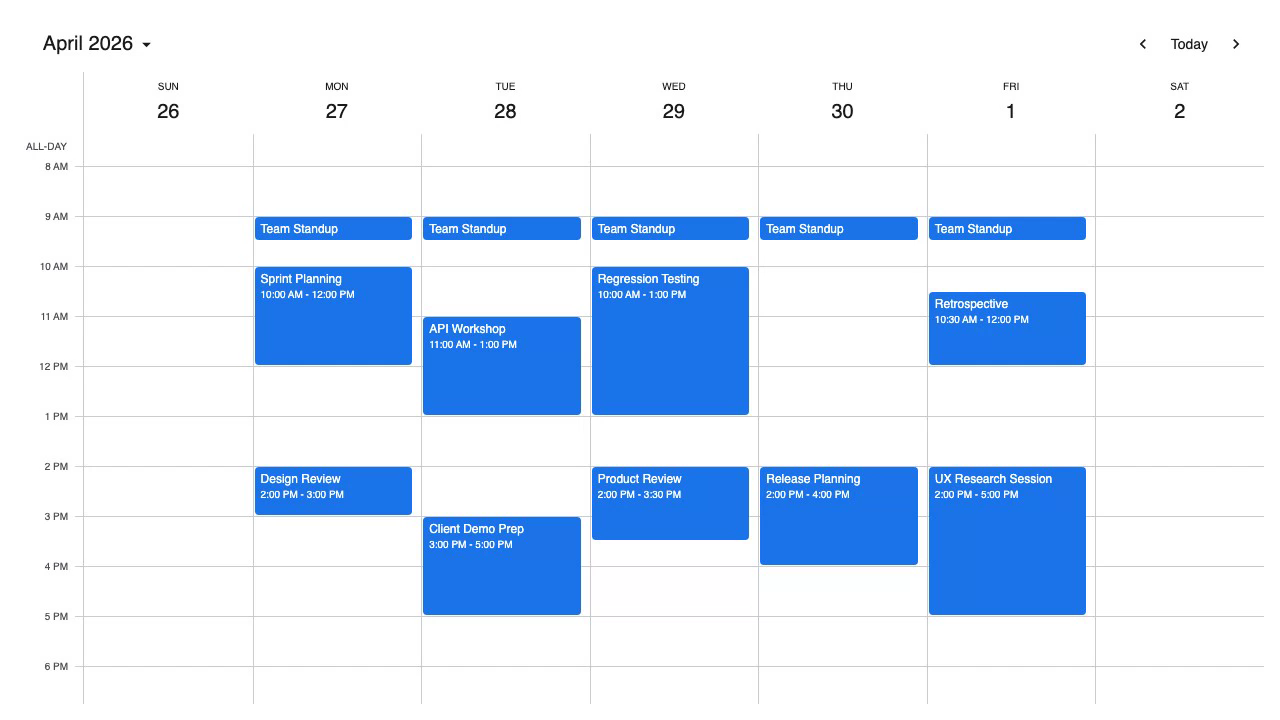
Mobiscroll is best when the timeline must be included from day one
The timeline view, drag-and-drop, drag-to-create, and resize ship in the same package as the time-grid scheduler, calendar, and agenda views. Switching between view types requires only a view config change. Resource scheduling does not require a separate purchase or upgrade.
The view.timeline.type property accepts 'day', 'week', 'month', or 'year', so teams can cover daily planning, weekly rosters, monthly roadmaps, and annual capacity views without additional plugins.
Mobiscroll includes the resource timeline in its base package, while DHTMLX Scheduler gates timeline and resource views behind Pro licensing. A team that needs resource scheduling pays $995 for Mobiscroll rather than $1,299 for DHTMLX Commercial when multiple instances are required.
Mobiscroll Event Calendar tradeoffs
The install process requires CLI authentication with the Mobiscroll private registry. Every developer and CI/CD environment must complete the authentication step before npm install works. This adds friction at onboarding and in automated pipelines.
Event dependencies are not supported. The library has no undo/redo stack. Excel export is absent. The print add-on is available at higher tiers only.
Mobiscroll has no free production tier, while DHTMLX Scheduler Standard gives compatible open-source projects day, week, and month views under the GPL. The 90-day trial is Mobiscroll's evaluation path.
Mobiscroll Event Calendar cost
Mobiscroll uses a per-project perpetual licensing model for internal applications:
- Scheduling & Calendaring: $995 (includes Event Calendar, single internal project)
- Complete: $1,955 (includes source code and priority support)
- Complete Company: $8,955 (multiple internal projects within one organization)
SaaS and multi-customer product licensing uses a subscription model with custom pricing based on customer count. Mobiscroll offers a 90-day trial and a 30-day money-back guarantee on purchases.
Mobiscroll Event Calendar developer experience
TypeScript definitions ship with the package. Documentation at mobiscroll.com covers all four view types with live examples.
Events use the data property (not events), and each event's resource field is resource, not resourceId. These naming differences are easy to miss when migrating from another library. Theme switching uses mobiscroll.setOptions({ themeVariant: 'dark' }), which applies globally without managing <link> tags.
Framework wrappers are available for React, Angular, Vue, jQuery, and Ionic.
Mobiscroll Event Calendar AI support
Mobiscroll ships no MCP server, no Claude Code skill, and no built-in AI assistant.
The private registry install process is the main friction point for AI agents. An agent following the standard npm install pattern generates npm install @mobiscroll/javascript, which fails without authentication. The data and resource property names also diverge from the conventions used by FullCalendar and DHTMLX Scheduler.
Use Mobiscroll when resource scheduling must be bundled
Mobiscroll Event Calendar fits applications that need resource scheduling, drag-and-drop, and resize in a single $995 purchase, the team can accommodate CLI authentication across all development environments and CI/CD pipelines, and switching between four view types using one config property matters.
Which one to pick
DHTMLX Scheduler Standard fits open-source projects that need day, week, and month calendar views at no cost under a GPL license. The public npm registry install works without any private registry setup. For teams that need the resource timeline, DHTMLX Pro starts at $599 with an Individual license and perpetual pricing.
Mobiscroll Event Calendar is the better fit when resource scheduling, drag-and-drop, and a timeline view must be available from the first release without a feature gate, and the team can support CLI authentication for package installs. The $995 per-project price includes all view types and interaction features without add-ons.
DHTMLX ships an MCP server for documentation retrieval in Claude Code and other AI coding agents. Mobiscroll ships no AI tooling. For teams using AI coding agents, DHTMLX is easier to support.
Bryntum Scheduler
Bryntum Scheduler is the stronger commercial choice when your application needs timeline views and drag-and-drop without GPL licensing or Mobiscroll CLI authentication. It supports React, Angular, Vue, and plain JavaScript, and Bryntum publishes per-developer pricing.
Bryntum also provides a free Scheduler trial download. Trial packages and framework wrappers are available on the public npm registry, and the Bryntum Scheduler npm repository guide explains licensed package access.