DHTMLX Gantt vs Syncfusion Gantt

DHTMLX Gantt and Syncfusion Gantt are both JavaScript Gantt libraries with free licensing paths, visual dependency links, drag-and-drop editing, and TypeScript support. The decision between them turns on where each product draws the free-tier boundary: DHTMLX Gantt locks auto-scheduling, critical path, resource management, baselines, and split tasks behind a paid Pro upgrade, while Syncfusion Gantt includes those features in a product that qualifies for a free Community License for teams under certain revenue thresholds.
The choice usually comes down to these questions:
- Does the organization qualify for the Syncfusion Community License?
- Does the application need auto-scheduling, critical path, resource management, baselines, or split tasks without a paid upgrade?
- Does the team need AI documentation support for Claude Code or another coding agent?
This comparison article compares DHTMLX Gantt and Syncfusion Gantt using these criteria: installation and setup, licensing and cost, scheduling features, export support, framework support, TypeScript support, and AI support.
What to know about DHTMLX Gantt and Syncfusion Gantt
The table below summarizes the criteria used in this comparison.
| Feature | DHTMLX Gantt | Syncfusion Gantt |
|---|---|---|
| License | GPL (Standard) / Commercial | Community (free) / Commercial |
| Free tier | GPL Standard edition | Community License |
| Auto-scheduling | Pro only | ✔️ |
| Critical path | Pro only | ✔️ |
| Resource management | Pro only | ✔️ |
| Baselines | Pro only | ✔️ |
| Drag-and-drop editing | ✔️ | ✔️ |
| Visual dependency links | ✔️ | ✔️ |
| Split tasks | Pro only | ✔️ |
| Undo / redo | ✔️ (extension) | ✔️ |
| Framework wrappers | React, Angular, Vue, Svelte | React, Angular, Vue, Blazor |
| TypeScript | ✔️ | ✔️ |
| Export to PDF / Excel | Online service | ✔️ (client-side) |
| MS Project import / export | Online service / add-on | XML workflow / integration sample |
| Multiple instances per page | Commercial license or higher | ✔️ |
| MCP server | ✔️ | ✔️ (JavaScript / React, stdio) |
| Claude Code skill | ✔️ (React) | ❌ |
| Built-in AI assistant | ❌ | ❌ |
DHTMLX Gantt
DHTMLX Gantt is a mature JavaScript Gantt library in active development since 2009. The Standard edition is GPL-licensed and free for compatible open-source projects. Paid licenses (Individual through Ultimate) unlock Pro features: auto-scheduling, critical path, resource management, baselines, split tasks, and task constraints.
The library uses a global gantt singleton. Configuration goes on the global object before gantt.init() runs, and data loads via gantt.parse() after init.
Installing DHTMLX Gantt
The package is on the public npm registry:
npm install dhtmlx-gantt@9.1.4
This minimal setup shows a two-task project with a dependency. Configuration must come before gantt.init(), and data loads after:
<!-- index.html -->
<style>
  html, body { margin: 0; height: 100%; }
  #container { width: 100%; height: 100vh; }
</style>
<div id="container"></div>
import { gantt } from 'dhtmlx-gantt';
import 'dhtmlx-gantt/codebase/dhtmlxgantt.css';

gantt.config.date_format = '%Y-%m-%d';
gantt.config.columns = [
  { name : 'text',     label : 'Task', tree : true, width : 250 },
  { name : 'duration', label : 'Days', align : 'center', width : 80 },
  { name : 'progress', label : '%',    align : 'center', width : 60,
    template : task => Math.round((task.progress || 0) * 100) + '%' }
];

gantt.ext.zoom.init({
  levels : [
    { name : 'month', scale_height : 50, min_column_width : 120,
      scales : [{ unit : 'month', format : '%F %Y' }] },
    { name : 'week',  scale_height : 50, min_column_width : 60,
      scales : [{ unit : 'month', format : '%F %Y' }, { unit : 'week', format : 'W%W' }] }
  ]
});
gantt.ext.zoom.setLevel('week');

gantt.init('container');

gantt.parse({
  data : [
    { id : 1, text : 'Phase 1: Discovery', start_date : '2026-05-01', duration : 14, open : true },
    { id : 2, text : 'Requirements',       start_date : '2026-05-01', duration : 5, parent : 1, progress : 1   },
    { id : 3, text : 'Design',             start_date : '2026-05-08', duration : 8, parent : 1, progress : 0.2 }
  ],
  links : [
    { id : 1, source : 2, target : 3, type : '0' }
  ]
});
Two setup details require attention:
- The default date format is
DD-MM-YYYY. Using ISO strings requires settinggantt.config.date_format = '%Y-%m-%d'. - The
gantt.init()call must come beforegantt.parse(). Reversing the order is a common setup mistake.
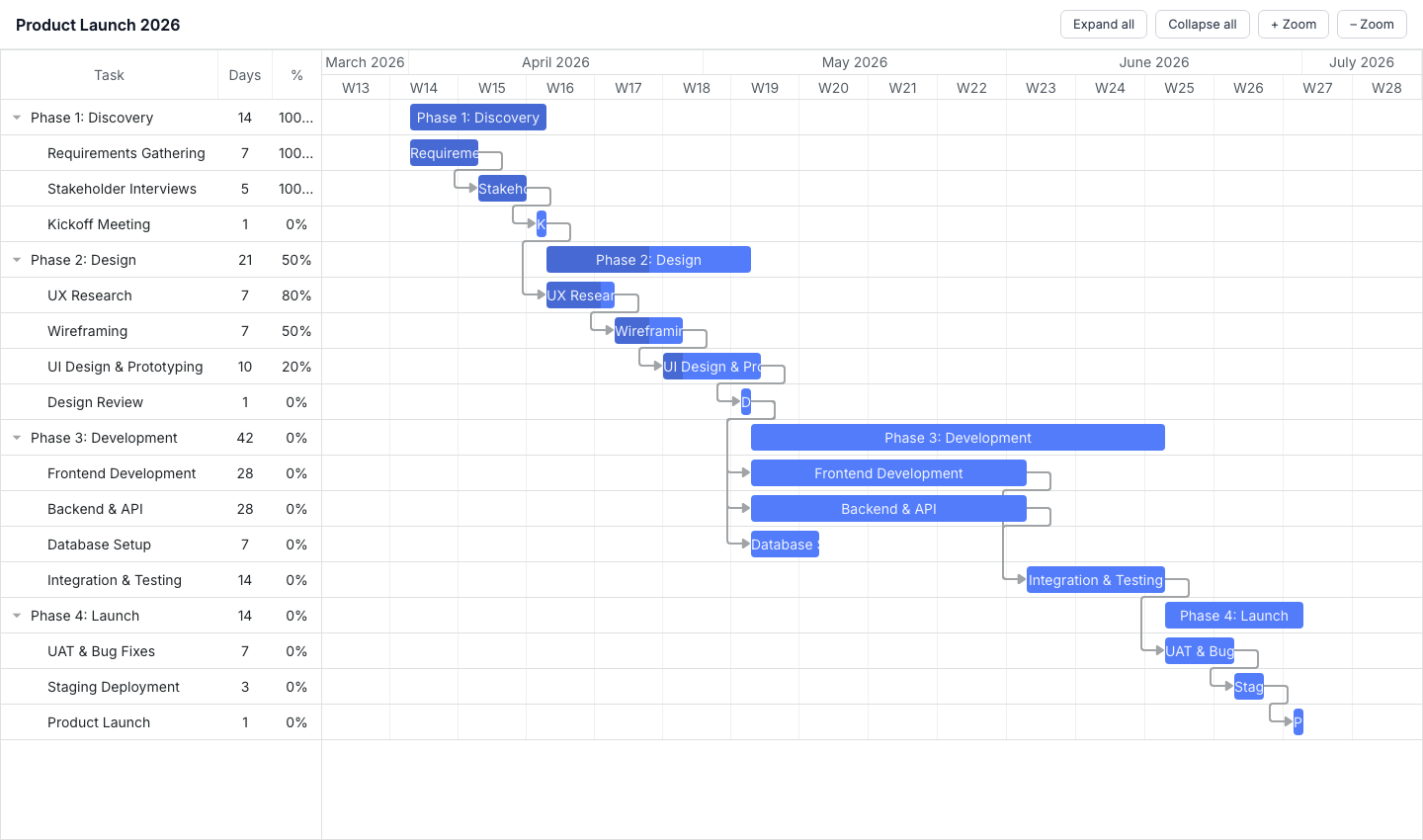
Where DHTMLX Gantt works best
The GPL Standard edition is free for compatible open-source projects with no time limit and no per-developer fee. Paid licenses are perpetual with no annual subscription, which lowers the long-term cost compared to subscription-based alternatives.
The export pipeline covers PDF, PNG, Excel, iCal, MS Project, and Primavera P6 through the DHTMLX online service for both Standard and paid editions. Seven built-in skins cover common enterprise Gantt layouts without custom CSS.
Compared with Syncfusion, DHTMLX gives open-source projects a cleaner no-cost path because the Standard edition is GPL-licensed and does not depend on company size, revenue, or funding. Syncfusion is better for qualifying commercial teams that need advanced scheduling features without buying a paid license.
DHTMLX Gantt tradeoffs
Auto-scheduling, critical path, resource management, baselines, and split tasks are all Pro-only. Production project management applications often need at least two of these, which means the Standard edition is a weak starting point for evaluating a complex scheduling tool.
Online export sends data to the DHTMLX-hosted service. GPL output includes a watermark. Paid licenses remove it during the active support period. Local export depends on license tier: Commercial, Enterprise, and Ultimate include the local PDF/PNG export module, while Individual buyers purchase it separately.
The global singleton carries state between test runs and makes side-by-side Gantt instances harder to reason about. Placing multiple independent Gantt charts on the same page requires the Commercial license or higher.
Compared with Syncfusion, DHTMLX is the more predictable commercial purchase because the license prices are published and perpetual. Syncfusion is cheaper only while the organization qualifies for the Community License.
DHTMLX Gantt cost
The Standard (GPL) edition is free for compatible open-source projects. Paid licenses are perpetual:
- Individual: $699
- Commercial: $1,399
- Enterprise: $2,999
- Ultimate: $5,999
The MS Project local export module is a $350 add-on for Individual and Commercial licenses. Local PDF/PNG export is a $350 add-on for Individual licenses and included with Commercial, Enterprise, and Ultimate licenses.
DHTMLX Gantt developer experience
TypeScript definitions ship with the package. Documentation at dhtmlx.com covers all features with code examples.
The initialization order is the first constraint to encode: gantt.config.* properties, then gantt.ext.zoom.init(), then gantt.init('container'), then gantt.parse(). Deviating from this order produces silent failures or stale configuration.
React, Angular, Vue, and Svelte wrappers are available.
DHTMLX Gantt AI support
DHTMLX ships two AI tools. The MCP server covers the full DHTMLX product line, including Gantt, Scheduler, Suite, Kanban, Diagram, and Spreadsheet. It uses retrieval-augmented generation over current documentation, so responses reflect the latest API rather than LLM training data. The command to register it in Claude Code:
claude mcp add --transport http dhtmlx-mcp https://docs.dhtmlx.com/mcp
DHTMLX also ships a Claude Code skill for the React Gantt wrapper:
npx skills add DHTMLX/skills --skill dhtmlx-react-gantt
The skill covers setup, CRUD patterns, theming, and known pitfalls for the React integration. DHTMLX ships no built-in AI assistant for end users.
The main friction point for AI agents without current documentation is the initialization order. An agent working from training data may call gantt.parse() before gantt.init(), or omit the date_format configuration, producing a broken or empty chart.
When to use DHTMLX Gantt
DHTMLX Gantt Standard fits open-source projects that need drag-and-drop, dependency links, and online export at no cost. DHTMLX Pro suits teams that want perpetual commercial licensing, need a small number of developers on the license, and can accept online export with an optional local module add-on.
Syncfusion Gantt
Syncfusion Gantt is a commercial JavaScript Gantt component part of the Essential Studio suite. The Community License makes it free for qualifying organizations. The full feature set is available under both the Community and commercial licenses:
- Auto-scheduling
- Critical path
- Baselines
- Split tasks
- Resource management
- Undo/redo
Community License qualifications: less than $1 million USD in annual gross revenue, five or fewer developers, and ten or fewer total employees. Teams receiving external funding must have less than $3 million from private equity or venture capital.
Installing Syncfusion Gantt
The package is available on the public npm registry:
npm install @syncfusion/ej2-gantt@33.2.4
A license key suppresses the trial validation banner. Community License holders generate a key from the My Account section of the Syncfusion website, then register it before initializing any component:
import { registerLicense } from '@syncfusion/ej2-base';
registerLicense('your-license-key-here');
This minimal setup shows a two-task project with a dependency. CSS covers the Gantt component and all its dependencies:
<!-- index.html -->
<style>
  html, body { margin: 0; height: 100%; }
  #container { height: 100vh; }
</style>
<div id="container"></div>
import { registerLicense } from '@syncfusion/ej2-base';
import { Gantt, Edit, Selection, Toolbar } from '@syncfusion/ej2-gantt';
import '@syncfusion/ej2-base/styles/material.css';
import '@syncfusion/ej2-buttons/styles/material.css';
import '@syncfusion/ej2-calendars/styles/material.css';
import '@syncfusion/ej2-dropdowns/styles/material.css';
import '@syncfusion/ej2-inputs/styles/material.css';
import '@syncfusion/ej2-navigations/styles/material.css';
import '@syncfusion/ej2-popups/styles/material.css';
import '@syncfusion/ej2-richtexteditor/styles/material.css';
import '@syncfusion/ej2-treegrid/styles/material.css';
import '@syncfusion/ej2-grids/styles/material.css';
import '@syncfusion/ej2-gantt/styles/material.css';

registerLicense('your-license-key-here');

Gantt.Inject(Edit, Selection, Toolbar);

const data = [
  {
    TaskID   : 1,
    TaskName : 'Phase 1: Discovery',
    subtasks : [
      { TaskID : 2, TaskName : 'Requirements', StartDate : new Date('2026-05-01'), Duration : 5, Progress : 100 },
      { TaskID : 3, TaskName : 'Design',       StartDate : new Date('2026-05-08'), Duration : 8, Progress : 20, Predecessor : '2' }
    ]
  }
];

new Gantt({
  dataSource : data,
  height     : '100%',

  taskFields : {
    id         : 'TaskID',
    name       : 'TaskName',
    startDate  : 'StartDate',
    duration   : 'Duration',
    progress   : 'Progress',
    dependency : 'Predecessor',
    child      : 'subtasks'
  },

  columns : [
    { field : 'TaskName', headerText : 'Task',     width : 250 },
    { field : 'Duration', headerText : 'Duration', width : 80  },
    { field : 'Progress', headerText : '%',        width : 60  }
  ],

  labelSettings    : { leftLabel : 'TaskName' },
  splitterSettings : { position  : '40%' },

  projectStartDate  : new Date('2026-05-01'),
  projectEndDate    : new Date('2026-05-20'),
  toolbar           : ['ZoomIn', 'ZoomOut', 'ZoomToFit'],
  highlightWeekends : true
}).appendTo('#container');
Four setup details require attention:
- The
Gantt.Inject()call must come before instantiation with any feature modules (Edit,Selection,Toolbar, and others). - CSS must cover the Gantt component and all its dependencies. The styles shown above can be replaced with a single Syncfusion combined theme file.
- The
taskFieldsconfig maps data property names to Gantt field identifiers. - The
registerLicense()call must come before the first component mounts.
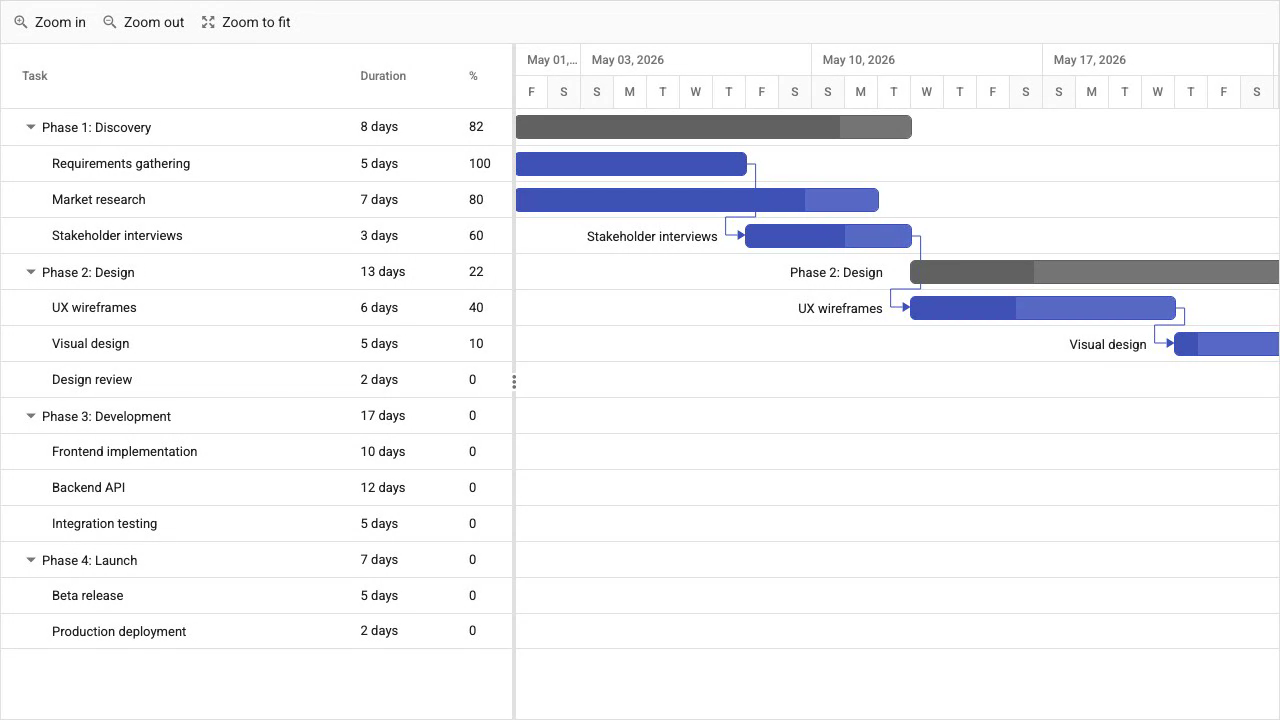
Where Syncfusion Gantt works best
The Community License is the main differentiator. Qualifying organizations get auto-scheduling, critical path, baselines, split tasks, resource management, and undo/redo at no cost, with no feature gating between community and commercial tiers.
Export to PDF, Excel, and CSV runs client-side through the Syncfusion export modules. Framework wrappers cover React, Angular, Vue, and Blazor.
Compared with DHTMLX Standard, Syncfusion Community is the better Gantt product for a qualifying commercial team because it includes the scheduling logic that production project-management applications usually need. DHTMLX Standard is better only when the project can use GPL licensing and does not need Pro scheduling features.
Syncfusion Gantt tradeoffs
CSS setup requires either a combined Syncfusion theme file or separate imports for the Gantt component and all its dependencies. The Gantt.Inject() call for each feature module adds a setup step that teams often miss.
Commercial licensing uses custom pricing with no published rates. Teams that outgrow the Community License criteria need to contact Syncfusion sales for pricing.
The Syncfusion JavaScript and React MCP servers communicate via stdio, not HTTP. They require MCP client configuration with an API key rather than a public HTTP URL. Syncfusion ships no dedicated Claude Code skill.
Syncfusion gives eligible teams a better free commercial offer than DHTMLX. DHTMLX gives teams clearer paid pricing after free eligibility ends because it publishes paid license prices, while Syncfusion requires a sales quote.
Syncfusion Gantt cost
The Community License is free for organizations with less than $1 million in annual gross revenue, five or fewer developers, and ten or fewer total employees (and less than $3 million in external funding). Teams generate a license key from the Syncfusion account portal at no charge.
Commercial licensing uses quote-based subscription pricing. Syncfusion does not publish standard rates. Teams need to contact sales for current terms.
Syncfusion Gantt developer experience
TypeScript type definitions ship with the package. Documentation at syncfusion.com includes live examples for all Gantt features with an in-browser code editor.
Framework wrappers for React (@syncfusion/ej2-react-gantt), Angular (@syncfusion/ej2-angular-gantt), and Vue (@syncfusion/ej2-vue-gantt) are on the same version cycle as the core. Blazor support is also available.
The taskFields configuration maps each data property to a Gantt field. The component works with existing data schemas without transformation.
Syncfusion Gantt AI support
Syncfusion ships MCP servers for its product line. The JavaScript server (@syncfusion/javascript-assistant) provides documentation retrieval and component code generation via stdio for VS Code, Cursor, Windsurf, and JetBrains. Syncfusion also provides a React MCP server. Syncfusion ships no dedicated Claude Code skill.
The multi-step setup (theme CSS, Gantt.Inject(), and registerLicense()) is the main friction point for AI agents. An agent without current Syncfusion documentation is likely to omit one of these steps.
When to use Syncfusion Gantt
The Community License is the right reason to choose Syncfusion Gantt. Qualifying organizations get the full feature set at no cost:
- Auto-scheduling
- Critical path
- Baselines
- Split tasks
- Client-side export
Which one to pick
Syncfusion Gantt is the right choice for organizations that qualify for the Community License: less than $1 million in annual revenue, five or fewer developers, and ten or fewer total employees. The full scheduling feature set is available under the Community License with no feature gating.
DHTMLX Gantt Standard suits open-source projects that need drag-and-drop, dependency links, and basic Gantt rendering under a GPL license at no cost. For production applications that need auto-scheduling, critical path, resource management, or baselines, the Pro edition is required. The perpetual licensing model with no annual subscription suits teams that prefer one-time payment.
DHTMLX is the better fit for teams using AI coding agents with the React wrapper. DHTMLX ships both an MCP server and a Claude Code skill for React. Syncfusion ships JavaScript and React MCP servers, but they use stdio rather than a public HTTP endpoint, which adds configuration work in Claude Code.
Bryntum Gantt
Bryntum Gantt is the relevant Bryntum option when the application needs auto-scheduling, critical path, and baselines without a GPL-compatible project or Community License qualification. It supports React, Angular, Vue, and plain JavaScript, publishes per-developer pricing, and provides an HTTP MCP server for AI-assisted development.
Bryntum also provides a free Gantt trial download. Trial packages and framework wrappers are available on the public npm registry, while licensed packages use Bryntum npm access.