Best FullCalendar alternatives for React

If we're using FullCalendar in React, the free core gives us day, week, month, and list views quickly. The limits appear when the product needs resource views, deeper TypeScript ergonomics, and fewer plugin wiring steps. FullCalendar Premium starts at $480 per year, and the React package wraps the core DOM library rather than replacing it with a React-native scheduling model.
FullCalendar becomes less attractive when resource views are required, because Bryntum Calendar includes that workflow in the base product instead of making it a Premium upgrade.
This article compares four FullCalendar alternatives for React using the criteria below.
- React integration quality.
- Resource scheduling and recurring event support.
- TypeScript fit.
- Pricing and license tiers.
- Where Bryntum Calendar is the strongest replacement for FullCalendar.
Bryntum Calendar
Bryntum Calendar ships resource scheduling, drag-and-drop, recurring events, undo/redo, and 11 view types in a single package with a first-party React wrapper. The Bryntum Calendar React quick start covers the full setup path. For React teams that need resource calendaring without paying a premium unlock fee on top of the base license, it is the most complete option in this comparison.
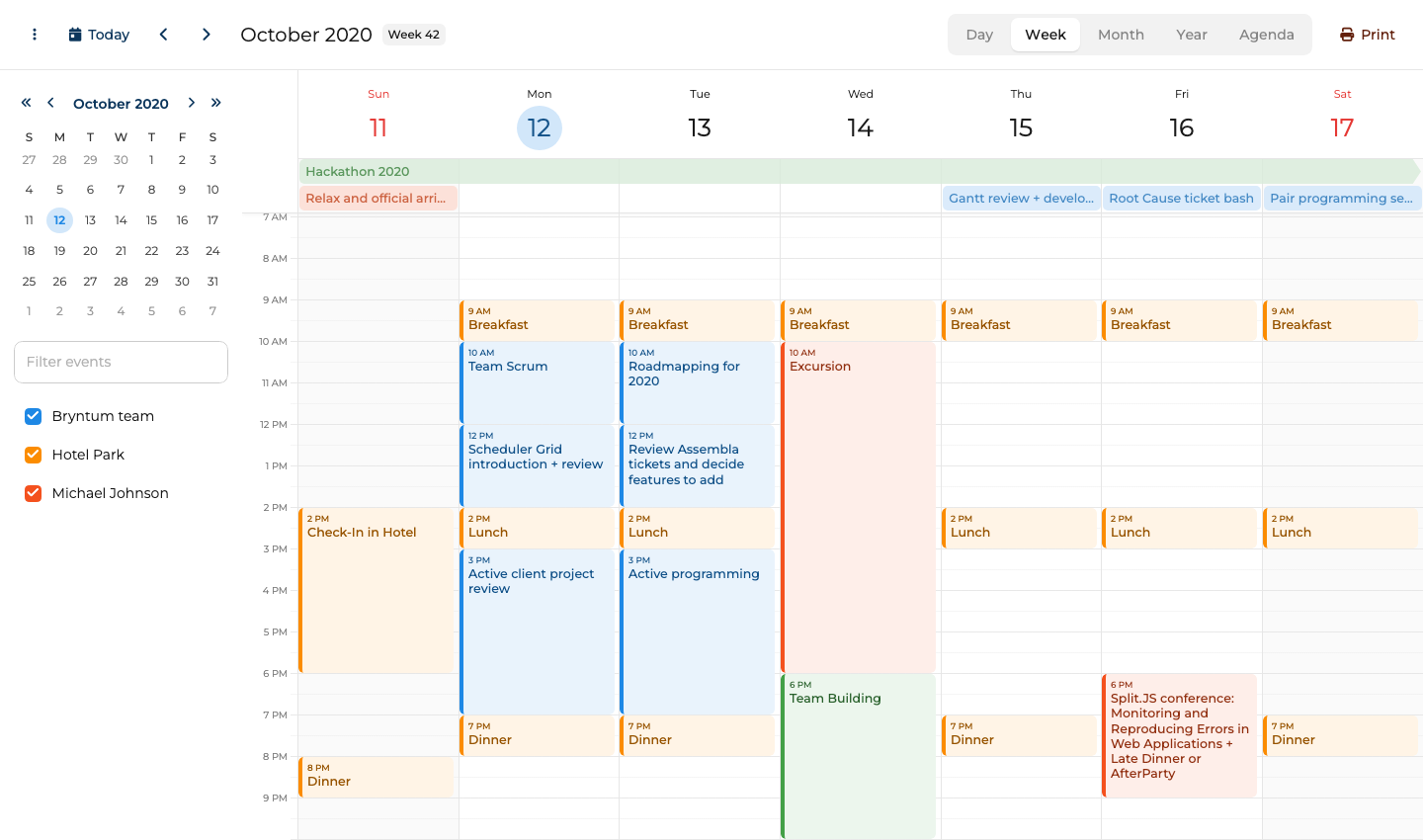
Bryntum Calendar setup as a React replacement for FullCalendar
Install the trial package from the public npm registry along with the React wrapper:
npm install @bryntum/calendar@npm:@bryntum/calendar-trial@7.3.0 @bryntum/calendar-react@7.3.0
Bryntum requires four CSS files imported in order. Add these to your main CSS file or index.js:
@import '@bryntum/calendar/fontawesome/css/fontawesome.css';
@import '@bryntum/calendar/fontawesome/css/solid.css';
@import '@bryntum/calendar/calendar.css';
@import '@bryntum/calendar/svalbard-light.css';
Then use the BryntumCalendar component in your app:
import { BryntumCalendar } from '@bryntum/calendar-react';

const resources = [
  { id : 'bryntum', name : 'Bryntum team',     eventColor : 'blue' },
  { id : 'hotel',   name : 'Hotel Park',       eventColor : 'orange' },
  { id : 'michael', name : 'Michael Johnson', eventColor : 'deep-orange' }
];

const events = [
  { id : 1, name : 'Hackathon 2025',                       startDate : '2025-10-11T14:00:00', endDate : '2025-10-18T12:00:00', allDay : true, resourceId : 'bryntum', eventColor : 'green' },
  { id : 2, name : 'Breakfast',                            startDate : '2025-10-12T09:00:00', endDate : '2025-10-12T10:00:00', resourceId : 'hotel' },
  { id : 3, name : 'Team Scrum',                           startDate : '2025-10-12T10:00:00', endDate : '2025-10-12T12:00:00', resourceId : 'bryntum' },
  { id : 4, name : 'Scheduler Grid introduction + review', startDate : '2025-10-12T12:00:00', endDate : '2025-10-12T14:00:00', resourceId : 'bryntum' }
];

const App = () => (
  <BryntumCalendar
    events={events}
    resources={resources}
    mode="week"
    date="2025-10-12"
  />
);
Bryntum Calendar removes the FullCalendar resource-view paywall
Bryntum Calendar differs from FullCalendar in several important ways across the React integration, feature set, and developer experience.
- First-party React wrapper. The
BryntumCalendarcomponent gives React teams a supported component API while keeping the Bryntum scheduling engine underneath. - Resource scheduling included in the base license. All resource views ship in the standard package, so Bryntum does not require a premium tier for resource views.
- Built-in TypeScript definitions. The library authors ship TypeScript types alongside the source, not as an afterthought, so autocomplete and type checking are consistent throughout.
- CSS variable theming. Bryntum ships 10 themes across five light/dark pairs, all switchable at runtime. FullCalendar offers limited theming without custom CSS work.
- No per-feature plugin wiring. Drag-and-drop, recurring events, and time zone support are available without installing and registering separate plugins for each feature.
- Larger bundle size. The uncompressed bundle exceeds 4 MB. Teams with strict load-time budgets should measure the impact early.
Bryntum Calendar starts with the Small Team license
Bryntum Calendar costs $680 per developer for the Small Team license, with a three-developer minimum and 12 months of updates included. A free trial is available through the npm registry.
Bryntum Calendar includes the scheduling features FullCalendar paywalls
Bryntum Calendar stands out as a FullCalendar alternative for three reasons.
- Native React component with full TypeScript support throughout the API.
- Resource scheduling, drag-and-drop, recurring events, and undo/redo are all included at no extra cost.
- Ten built-in themes covering light and dark appearances, switchable at runtime.
Bryntum Calendar costs more than FullCalendar's free core
Three limitations apply when evaluating Bryntum Calendar.
- Commercial-only with no free or open source tier for any project type.
- CSS import order is strict and will break silently if the four files are not in the correct sequence.
- The uncompressed bundle size exceeds 4 MB, which requires early evaluation for performance-sensitive applications.
Schedule-X
Schedule-X offers an MIT-licensed, TypeScript-first calendar with first-party React support via the @schedule-x/react adapter. Its free core is the lightest option in this comparison. The trade-off is a smaller free feature set, because resource scheduling and drag-and-drop require Schedule-X Premium.
Schedule-X setup as a lightweight React calendar
Install the core packages from the public npm registry:
npm install @schedule-x/react @schedule-x/calendar @schedule-x/theme-default
Set up the calendar and render it with the ScheduleXCalendar component:
import { ScheduleXCalendar, useCalendarApp } from '@schedule-x/react';
import { createViewWeek, createViewMonthGrid, createViewDay } from '@schedule-x/calendar';
import '@schedule-x/theme-default/dist/index.css';

const App = () => {
  const calendar = useCalendarApp({
    views: [createViewDay(), createViewWeek(), createViewMonthGrid()],
    events: [
      { id: '1', title: 'Team Standup',    start: '2026-05-12 09:00', end: '2026-05-12 09:30' },
      { id: '2', title: 'Sprint Planning', start: '2026-05-12 10:00', end: '2026-05-12 12:00' },
      { id: '3', title: 'Design Review',   start: '2026-05-13 14:00', end: '2026-05-13 15:30' }
    ]
  });

  return <ScheduleXCalendar calendarApp={calendar} />;
};
Schedule-X trades FullCalendar maturity for a TypeScript-first core
Schedule-X takes a different approach to FullCalendar in its architecture, licensing, and scope.
- MIT-licensed core. The MIT license covers the core with no watermark and no evaluation restriction, unlike FullCalendar where resource views require a paid upgrade.
- TypeScript-first from the ground up. The API integrates types from the ground up rather than bolting on declarations, giving a more consistent experience than the partial TypeScript coverage in FullCalendar.
- Lighter bundle. Schedule-X ships only what is imported, making it a good fit for apps where bundle size is a constraint.
- Resource scheduling is Premium. Schedule-X gates resource view behind Schedule-X Premium, while FullCalendar gates resource views behind FullCalendar Premium.
- Newer project with a smaller community. Schedule-X has less community documentation, fewer Stack Overflow answers, and a shorter issue history than FullCalendar.
- Fewer view types. Schedule-X covers day, week, month grid, and month agenda. FullCalendar adds list view and resource views (with Premium).
Schedule-X is a cleaner lightweight alternative to FullCalendar, while Bryntum Calendar is the stronger replacement when the React app needs resource scheduling and editing workflows.
Schedule-X keeps core React calendars free
Schedule-X core is MIT-licensed and free. Premium plugins, including resource view, drag-and-drop, drag-to-create, and event forms, start at €479 per year for two to three developers or €999 for a lifetime license with one year of updates.
Schedule-X gives React teams a small calendar core
Schedule-X has three advantages as a FullCalendar alternative.
- Free to use with no per-developer fees and no premium unlock required for core views.
- TypeScript-first API with consistent type safety throughout the library.
- Composable plugin architecture keeps the bundle small by default.
Schedule-X still charges for resource scheduling
Three limitations make Schedule-X unsuitable for some projects.
- Resource scheduling requires Schedule-X Premium, which reduces its appeal as a free FullCalendar replacement.
- Newer project with a smaller community and less third-party documentation than FullCalendar.
- Fewer built-in view types and theming options compared to commercial alternatives.
Mobiscroll Event Calendar
Mobiscroll Event Calendar targets mobile-first interaction with iOS, Material, and Windows themes and native-quality touch gestures. Resource scheduling is included without a premium upgrade. For teams building applications where mobile usability is a primary requirement, it offers a level of polish that FullCalendar does not match out of the box.
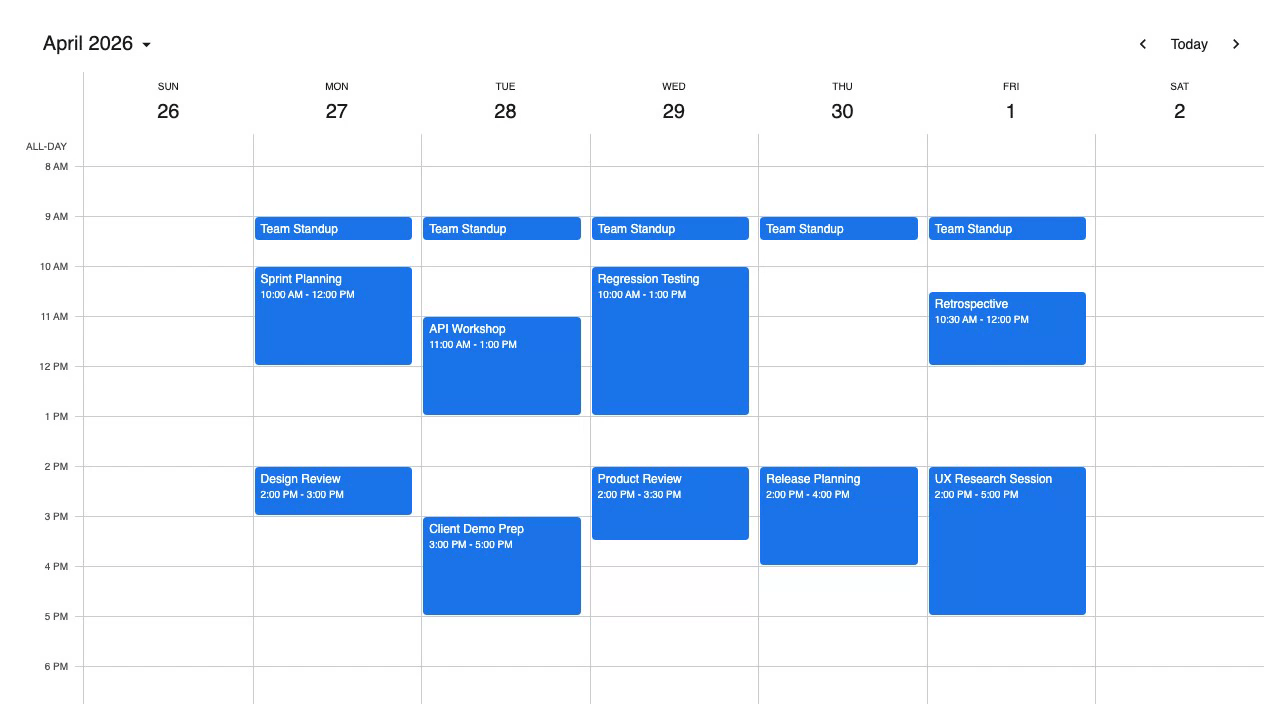
Mobiscroll Event Calendar setup with React
Configure the Mobiscroll private npm registry before installing the React package:
npm install @mobiscroll/react
Import the CSS and use the Eventcalendar component:
import { Eventcalendar } from '@mobiscroll/react';
import '@mobiscroll/react/dist/css/mobiscroll.min.css';

const events = [
  { id: 1, title: 'Team Standup',    start: '2026-05-12T09:00', end: '2026-05-12T09:30' },
  { id: 2, title: 'Sprint Planning', start: '2026-05-12T10:00', end: '2026-05-12T12:00' },
  { id: 3, title: 'Design Review',   start: '2026-05-13T14:00', end: '2026-05-13T15:30' }
];

const App = () => (
  <Eventcalendar
    view={{ calendar: { type: 'month' } }}
    data={events}
    dragToMove
    dragToCreate
  />
);
Mobiscroll improves on FullCalendar's mobile interaction
Mobiscroll takes a different position from FullCalendar in terms of mobile support, resource scheduling, and recurrence format.
- Mobile-first design. Mobiscroll ships platform-specific themes (iOS, Material, Windows) and touch interaction patterns tuned for small screens. FullCalendar requires custom work to match this on mobile.
- Built-in resource scheduling. The timeline and resource calendar views are part of the base package. FullCalendar requires a Premium upgrade for resource views.
- Native-quality touch gestures. Drag-to-create and drag-to-move are optimized for touch, not adapted from mouse interactions.
- Proprietary recurrence format. Mobiscroll uses its own object-based recurrence API rather than RFC 5545 RRULE strings, which can create interoperability issues when exchanging event data with other calendar systems.
- Per-project pricing. Mobiscroll starts at a perpetual internal project license, while FullCalendar Premium starts with annual pricing.
- No public npm install without authentication. Mobiscroll packages require private registry authentication before
npm installworks, which adds friction in CI/CD pipelines.
Mobiscroll solves FullCalendar's mobile limitations better than Bryntum Calendar, but Bryntum is the better replacement when scheduler depth matters more than touch-first UI.
Mobiscroll Event Calendar starts with an internal project license
Mobiscroll Event Calendar starts at $995 for a single internal project as a perpetual license. The Complete internal project license starts at $1,955 and adds the full product set, source code, and priority support.
Mobiscroll Event Calendar gives React apps touch-first UX
Mobiscroll is a strong FullCalendar alternative for mobile-first projects.
- Mobile-first with platform-specific themes (iOS, Material, Windows) and native touch gesture support.
- Resource scheduling is included without a premium upgrade.
- Drag-to-create and drag-to-move work reliably on both desktop and touch devices.
Mobiscroll Event Calendar adds private registry and project licensing
Three limitations apply before choosing Mobiscroll.
- The internal project license is priced per project, so multi-project product teams need a higher tier or a SaaS license.
- The proprietary recurrence format does not use RFC 5545 RRULE strings, complicating data interoperability with other calendar systems.
- Private registry configuration may be required before installation, adding friction for CI/CD environments.
Syncfusion Schedule
Syncfusion Schedule ships one of the largest view sets available: Day, Week, Work Week, Month, Agenda, Month Agenda, and Timeline variants including Timeline Day, Timeline Week, Timeline Work Week, and Timeline Month. The component is part of the Syncfusion Essential Studio suite and requires a license key before rendering. For enterprise teams that need an exhaustive range of built-in views and are already inside the Syncfusion product suite, it is the most feature-complete option in this comparison.
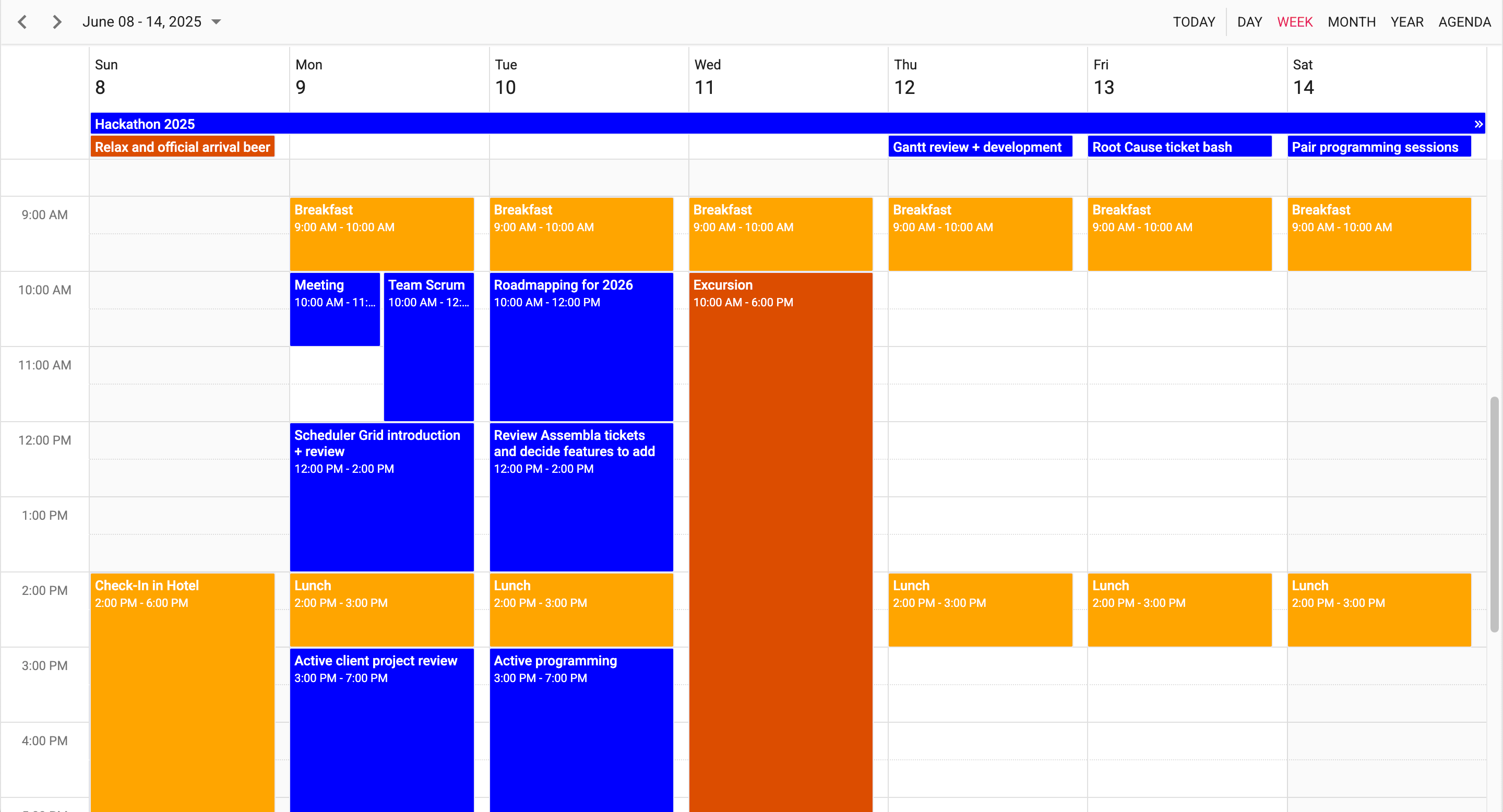
Syncfusion Schedule setup with React services
Install the schedule package:
npm install @syncfusion/ej2-react-schedule
Syncfusion requires multiple CSS imports to cover all the component dependencies. Add these to your main CSS file or index.js:
@import '@syncfusion/ej2-base/styles/material.css';
@import '@syncfusion/ej2-buttons/styles/material.css';
@import '@syncfusion/ej2-calendars/styles/material.css';
@import '@syncfusion/ej2-dropdowns/styles/material.css';
@import '@syncfusion/ej2-inputs/styles/material.css';
@import '@syncfusion/ej2-lists/styles/material.css';
@import '@syncfusion/ej2-navigations/styles/material.css';
@import '@syncfusion/ej2-popups/styles/material.css';
@import '@syncfusion/ej2-splitbuttons/styles/material.css';
@import '@syncfusion/ej2-react-schedule/styles/material.css';
Register your license key before rendering, then use ScheduleComponent with injected view services:
import { registerLicense } from '@syncfusion/ej2-base';
import {
  ScheduleComponent,
  Day,
  Week,
  Month,
  Inject
} from '@syncfusion/ej2-react-schedule';

registerLicense('your-license-key');

const events = [
  { Id: 1, Subject: 'Team Standup',    StartTime: new Date(2026, 4, 12, 9, 0),  EndTime: new Date(2026, 4, 12, 9, 30) },
  { Id: 2, Subject: 'Sprint Planning', StartTime: new Date(2026, 4, 12, 10, 0), EndTime: new Date(2026, 4, 12, 12, 0) },
  { Id: 3, Subject: 'Design Review',   StartTime: new Date(2026, 4, 13, 14, 0), EndTime: new Date(2026, 4, 13, 15, 30) }
];

const App = () => (
  <ScheduleComponent
    selectedDate={new Date(2026, 4, 12)}
    eventSettings={{ dataSource: events }}
  >
    <Inject services={[Day, Week, Month]} />
  </ScheduleComponent>
);
Syncfusion Schedule adds more built-in views than FullCalendar
Syncfusion Schedule differs from FullCalendar in its view depth, setup complexity, licensing model, and enterprise positioning.
- Largest built-in view set. Syncfusion covers Day, Week, Work Week, Month, Agenda, Month Agenda, and all four Timeline variants in a single package. FullCalendar requires plugins for each view category, and resource views are Premium-only.
- Extensive customization options. Cell templates, event templates, and toolbar customization are available through props and render functions without writing raw CSS overrides.
- Community License for smaller teams. The Syncfusion Community License is available for organizations with less than $1 million USD in annual gross revenue, five or fewer developers, 10 or fewer employees, and no more than $3 million USD in outside funding.
- More complex setup than any other option. Syncfusion requires 10 separate CSS imports, a
registerLicense()call before rendering, and explicit<Inject services={...} />for each view type. FullCalendar requires several plugin installs but is simpler to configure. - Paid license required above the free license limits. Larger organizations need a paid Essential Studio license before using Syncfusion Schedule in production.
Syncfusion Schedule gives React teams a broad enterprise component suite, while Bryntum Calendar gives them a more focused scheduling product with less suite-level setup.
- License key required at render time. Forgetting to call
registerLicense()before the component mounts produces a console warning and watermarked output, which can catch developers off guard during initial setup.
Syncfusion Schedule pricing depends on Community License eligibility
Syncfusion Schedule is free under the Community License for eligible organizations with less than $1 million USD in annual gross revenue, five or fewer developers, 10 or fewer employees, and no more than $3 million USD in outside funding. Larger organizations need a paid Essential Studio license.
Syncfusion Schedule benefits React teams already using Essential Studio
Syncfusion Schedule has three advantages for feature-complete enterprise applications.
- The largest built-in view set of any option in this comparison, including all Timeline variants.
- Extensive template and customization options available through props without raw CSS overrides.
- The Community License is free for eligible smaller organizations, unlike the FullCalendar resource-view paywall that applies regardless of company size.
Syncfusion Schedule requires heavier setup than FullCalendar
Three limitations apply when evaluating Syncfusion Schedule.
- The most complex setup in this comparison: ten CSS imports, a license registration call, and explicit view injection are all required before the calendar renders.
- Paid licensing is required once an organization exceeds the Community License thresholds.
registerLicense()must be called before the component mounts, and omitting it produces a watermarked output that can be confusing during onboarding.
Which FullCalendar alternative should React teams choose?
The table below compares all five options, including FullCalendar as the baseline for this comparison.
| Component | Resource scheduling | Open source | React-native | TypeScript | Mobile optimized | Price |
|---|---|---|---|---|---|---|
| FullCalendar | Premium only ($480/yr) | ✓ (MIT core) | ✗ (JS wrapper) | Partial | ✗ | Free core / $480/yr Premium |
| Bryntum Calendar | ✓ | ✗ | ✓ | ✓ | ✗ | $680/developer |
| Schedule-X | ✗ | ✓ (MIT) | ✓ | ✓ | ✗ | Free / Pro add-ons |
| Mobiscroll Event Calendar | ✓ | ✗ | ✓ | ✓ | ✓ | From $995/internal project |
| Syncfusion Schedule | ✓ | ✗ | ✓ | ✓ | ✗ | Free under Community License / paid Essential Studio license |
The table below maps specific use cases to the best-fit option from this comparison.
| Use case | Recommended option |
|---|---|
| Teams that need resource scheduling without a premium unlock | Bryntum Calendar |
| Teams that want a free, open source calendar for React | Schedule-X |
| Teams building mobile-first applications | Mobiscroll Event Calendar |
| Teams that need the most comprehensive view set for an enterprise suite | Syncfusion Schedule |
For teams whose main reason for leaving FullCalendar is the resource view paywall, Bryntum Calendar is the clearest replacement. Resource scheduling, drag-and-drop, recurring events, and undo/redo are all included in the base license, and the first-party React wrapper avoids hand-written DOM lifecycle code.
If budget is the deciding factor, Schedule-X provides a well-typed, composable calendar core for React at no cost. It requires Premium for resource scheduling, but for appointment-style calendaring it is a capable and modern alternative.
For teams where the end user is primarily on a phone or tablet, Mobiscroll Event Calendar has the strongest mobile-specific investment of any option here. For teams already inside the Syncfusion product suite who need a broad view set, the Community License makes Syncfusion Schedule worth evaluating before committing to a paid tier.
Start evaluating Bryntum Calendar today with the free trial available on npm.